Clearing Cache
Clear Browser Cache
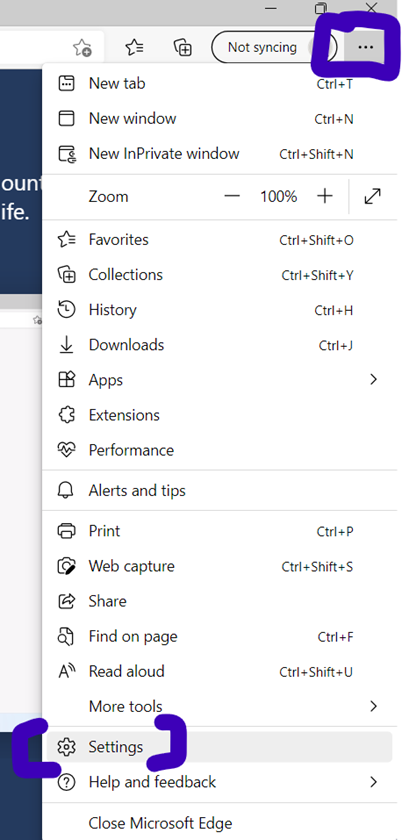
Click the ‘three dots’ in the top right corner of Edge, then click “settings” at the bottom.
Click “Privacy, search, and services in the left pane, then
look under “Clear browsing data” and click on the button “Choose what to
clear”:
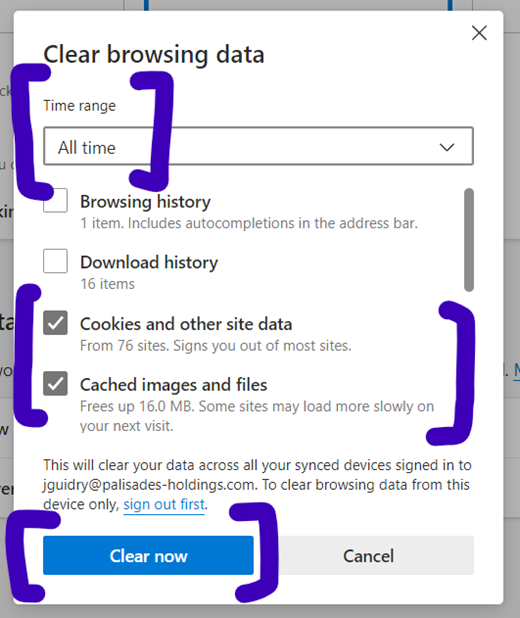
Under time range, select “All time”. Only check “Cookies and
other site data” and “Cached images and files”, then click on “Clear now”.
Related Articles
Clear Cache (Google Chrome)
In Chrome, click the dots in the top right corner, then "Settings": Click "Privacy and security" in the left pane, then "Delete browsing data" in the right: Make sure the "Advanced" tab is selected. for "Time range" change it to "All time". Check the ...